
ADDA Rental Manager · Landlord Reports
Landlord Reporting Software for UAE Property Managers
Your landlords want to know how their property is doing. Building that summary by hand takes two to three hours per landlord, every month. ADDA Rental Manager puts the report together from data that's already in the system and emails it out on the date you choose.
What Is Landlord Reporting Software?
Landlord reporting software takes the data a property manager already holds — occupancy, rental income, expenses, contracts — and turns it into a periodic statement for each owner, showing how their units performed over a given period.
In ADDA Rental Manager you pick a landlord and a date range, and the report is generated for you. It covers every unit that the owner holds, across every building. You can preview it, download it, or email it straight from the system. Set it once to go monthly and you don't have to log in to trigger it at all.
Why Monthly Landlord Reports Take So Long to Produce
There's a conversation that happens in property management offices across Dubai every month, and nobody involved enjoys it. A landlord calls, or WhatsApps, or sends an email with no greeting. How's my property doing? What's the occupancy? What came in, what went out?
You're in the middle of three maintenance jobs, a renewal and a parking dispute. Now you have to stop and build a report from scratch. Contracts module, income tracker, expense tracker, occupancy figures, paste it all into Excel, work out the profit, format it, check the numbers, send it.
Two to three hours. Per landlord. Every month. If you're handling ten landlords, that's twenty to thirty hours gone. And it doesn't scale gently — it's also the follow-up calls when a number looks different from last month, the explanation of why Q1 looks odd because of the maintenance cycle, and the re-send when the PDF didn't come through.
Why Property Managers Shouldn't Be Building Reports by Hand
Most firms solve this by absorbing it. Someone stays late in the last week of the month, or eventually you hire a coordinator whose job is largely assembling reports from data that already exists somewhere else.
That's the part worth questioning. Every figure in a landlord report is already sitting in your system. Occupancy is there. Collections are there. Expenses are there. Contracts are there. The only thing missing was something to put them together and send them.
ADDA Rental Manager does that part. The reporting workload stops growing with your landlord count, which is what makes going from ten owners to twenty-five possible without adding a person to do it.
How Landlord Reports Work in ADDA Rental Manager
Pick a landlord, pick a period
Choose the owner and the date range, and the report pulls everything across their units automatically. Last month, last quarter, half-yearly, or any custom range you need.
All their units, wherever they are
If an owner has three units in one building and three in another, that's one report covering all six, not two reports they have to reconcile themselves.
Set it once and stop thinking about it
Choose whether it goes on the first or the last day of each month, write the covering note you want it to carry, and save. From then on it goes out on its own.
The same format, every single month
When every report looks identical, an owner can compare one period against another and decide about rent revision or renewal without ringing you to ask what changed.
Numbers that match your accounts
The report pulls live from contracts, income and expenses. There's no separate data entry and no reconciliation step, so the figures a landlord sees are the same figures in your books.
A six-month question answered in two minutes
When an owner asks how his units did over the last two quarters, you select his name, set the range, and fetch it. You're not rebuilding anything.
What Does a Landlord Report Include?
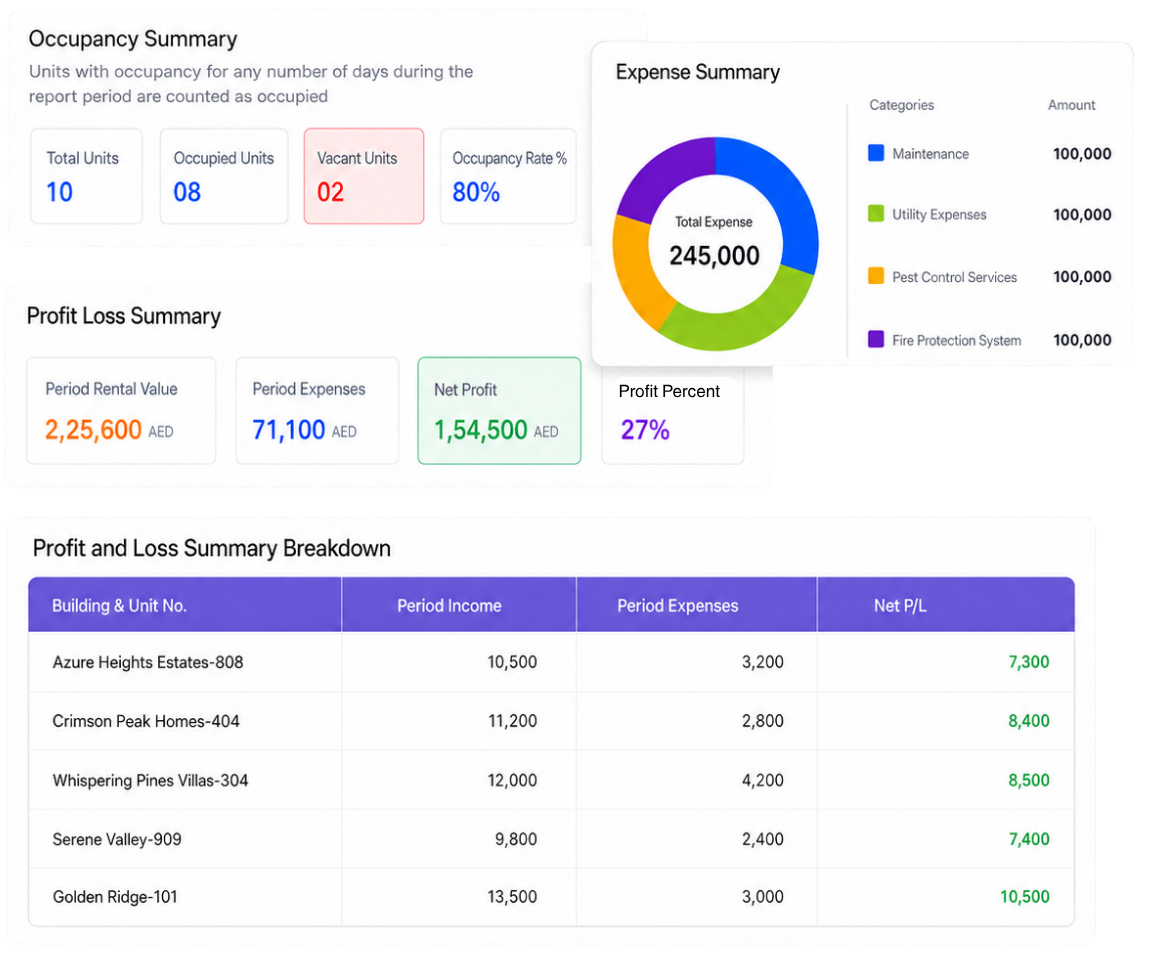
Each report arrives as a formatted PDF and covers the period you selected.
Occupancy summary
Total units, how many are occupied, how many are vacant, and the occupancy rate.
Portfolio performance
Rental value for the period, total expenses, net profit, and profit as a percentage.
Expense breakdown
Expenses split by category with a chart, so an owner can see straight away whether maintenance is running high.
Unit-level profit and loss
Profit and loss for each individual unit, sorted from best performing to worst, showing which units are earning and which need attention.
Active contracts
All active contracts in the period, with start dates, end dates and values, sorted by which ones are ending soonest.
Vacancy detail
How long empty units have been vacant and when the last tenant moved out. Hidden if nothing's vacant.
Who Uses Landlord Reporting in the UAE
Property management companies, build-to-rent operators and landlord representatives across Dubai, Abu Dhabi and the rest of the UAE use ADDA Rental Manager. Landlord reporting matters most where one firm manages units for several different owners across multiple buildings, which is the shape of most rental portfolios in this market.
It's part of the platform alongside lease and contract management, cheque management, income and expense tracking, helpdesk and the dashboard — not a separate product or a separate licence.
Frequently Asked Questions
Does one report cover a landlord's units across different buildings?+
Yes. Everything that owner holds is consolidated into a single report for the period, and the profit and loss table still breaks it down unit by unit.
Can we customise what the automated email says?+
Yes. You write the covering message once in the setup screen and it goes out with every report. The report attaches itself, so nobody needs to generate and attach anything manually.
Can we generate a report for a custom date range?+
Yes. Scheduled sends are monthly, but you can pull any period on demand — last quarter, six months, or a specific range an owner has asked about.
If a landlord wants six months' performance, is that six reports?+
No. Set the range to cover the whole period and you get one consolidated report, with every figure calculated across the full range.
What if there were no expenses that month?+
The expense section shows a no-expenses state rather than an empty chart, and net profit equals the rental income for the period.
How is occupancy calculated?+
A unit counts as occupied if it had a tenancy for any number of days during the period. That's stated on the report itself, so there's no ambiguity for the owner about how the figure was arrived at.
Can landlords log in and pull reports themselves?+
Not at present. Reports are generated and sent by the property manager, either on demand or on the monthly schedule, and the landlord receives them by email.
How much time does automated landlord reporting save?+
Most managers spend two to three hours per landlord report. Across a ten-landlord portfolio that is twenty to thirty hours reclaimed every month, and the workload does not grow with each new owner.
See the Magic ADDA Rental Management Software Can Do for Your Business
Transform your landlord reporting through our 20-minute demo.
Get in touch
Tell us about your community

By submitting, you agree to ADDA's terms and privacy policy. We'll never share your details.